Everything your phones do,
in one calm place.
TimberSwitch is a full business phone system from $9 a month. Logins are free; you pay for each phone line, not each person who signs in. Here is what it does, shown with real screens from the app. Every name and number in them is made up.
- ✓ Free setup: we set it up for you
- ✓ Free number porting help
- ✓ Support from real people, included
- ✓ No setup fees
Every caller gets a friendly answer on the first ring, even when the whole team is busy.
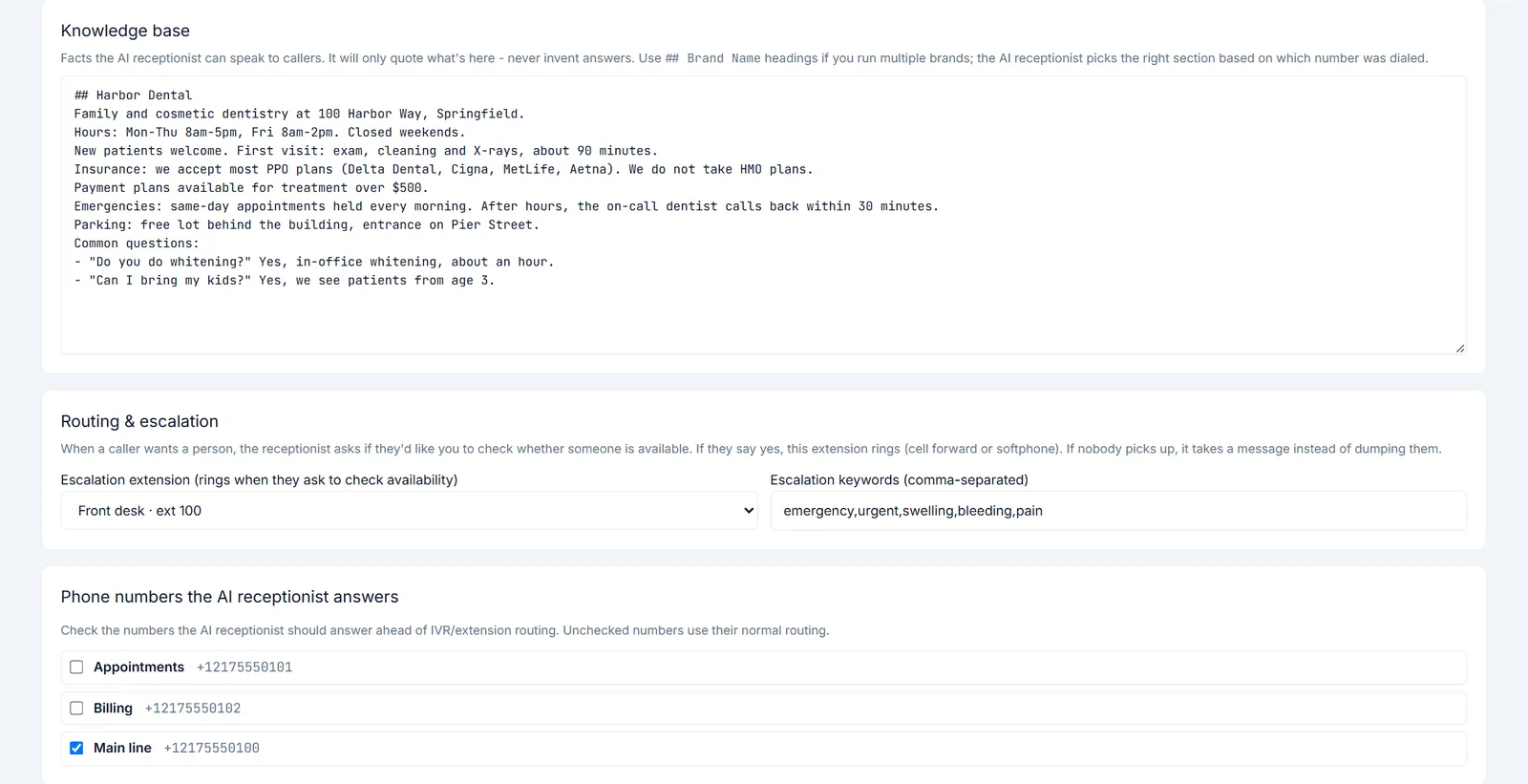
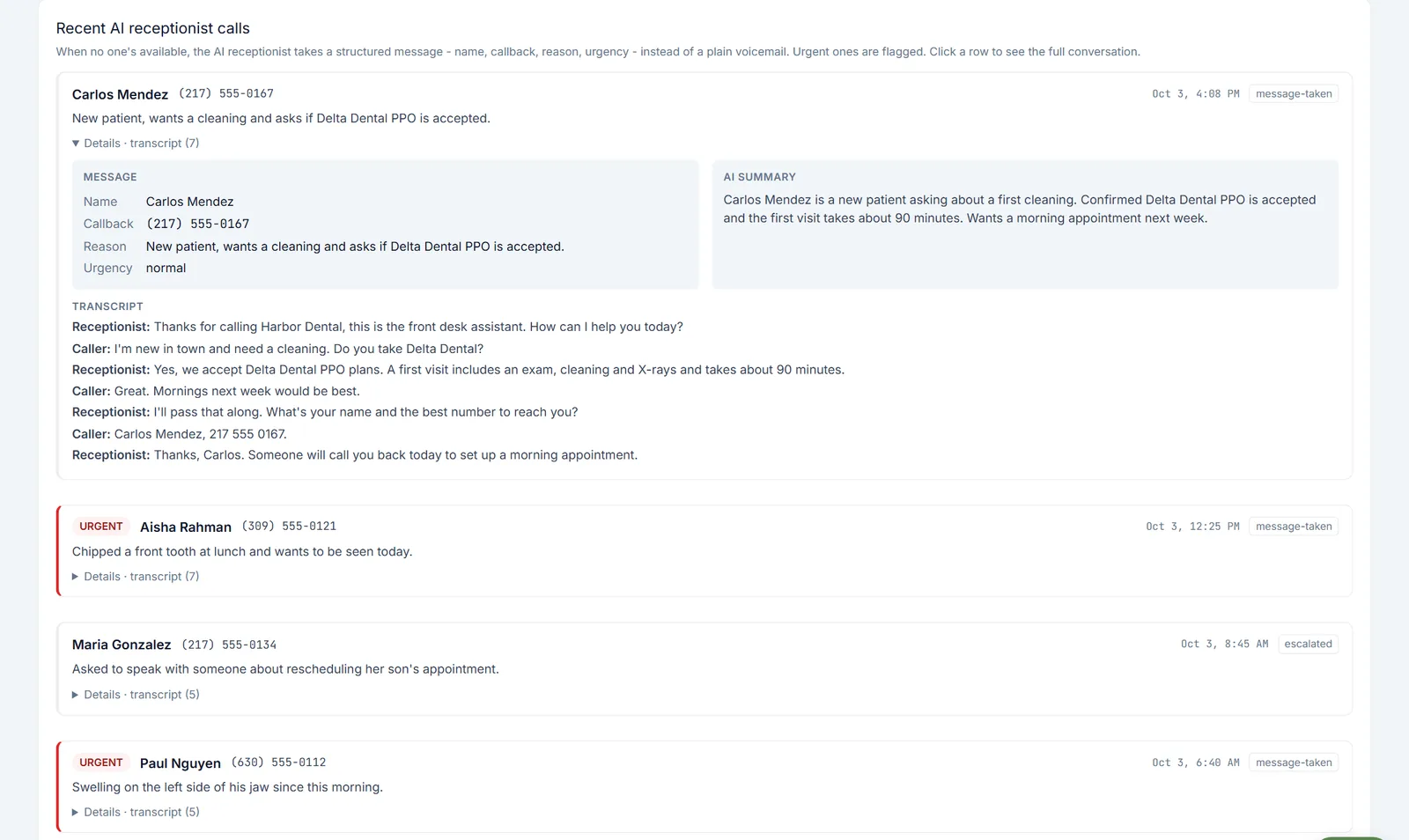
Coming soon as an add-on to any plan. It greets callers as your business, answers common questions from the facts you give it, and asks before it rings a person. If nobody is free, it takes a proper message, so you call back the right people first instead of playing voicemail tag.
- Your greeting, your choice of voice and your house rules
- Answers only from the facts you give it, like hours, insurance or parking, and never makes up an answer
- When a caller wants a person, it asks first, then rings the extension you choose
- Takes a message with name, callback number, reason and urgency, plus an AI summary and the full transcript
- Flags urgent calls, using keywords you set
The AI receptionist is built and being readied for launch. Until it is switched on, calls ring your phone menu, extensions and ring groups as usual, and every package already includes those.
See pricing →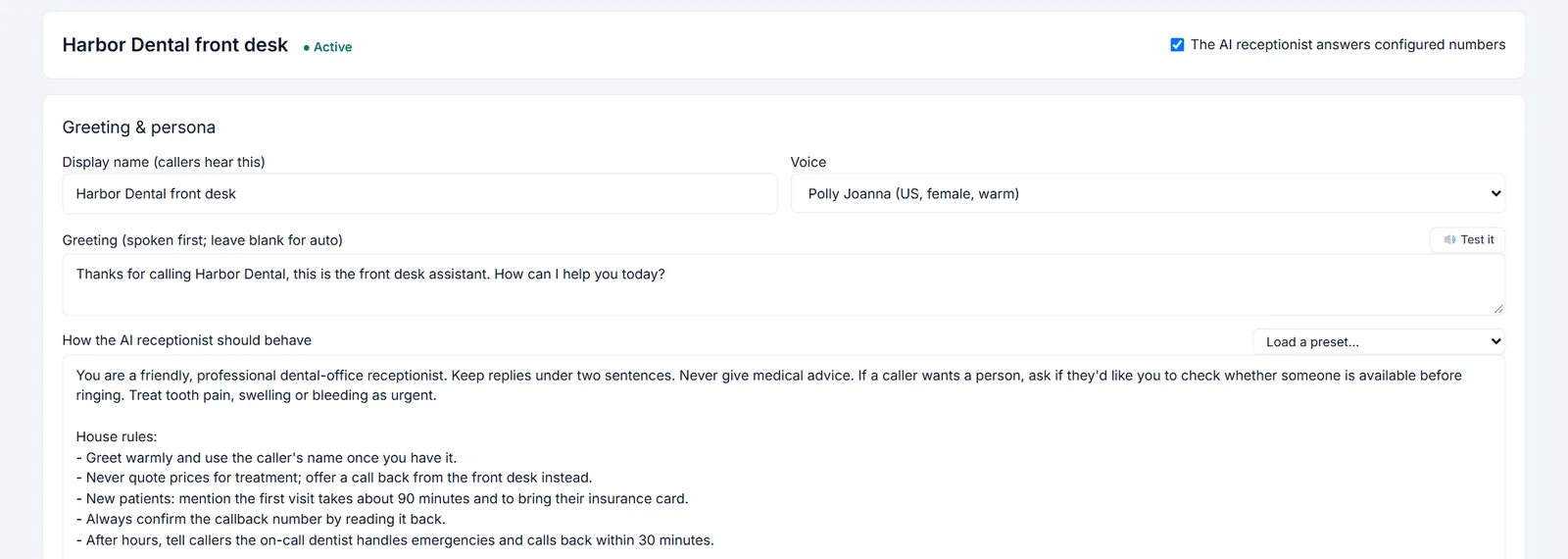
Fewer spam interruptions, without missing real customers.
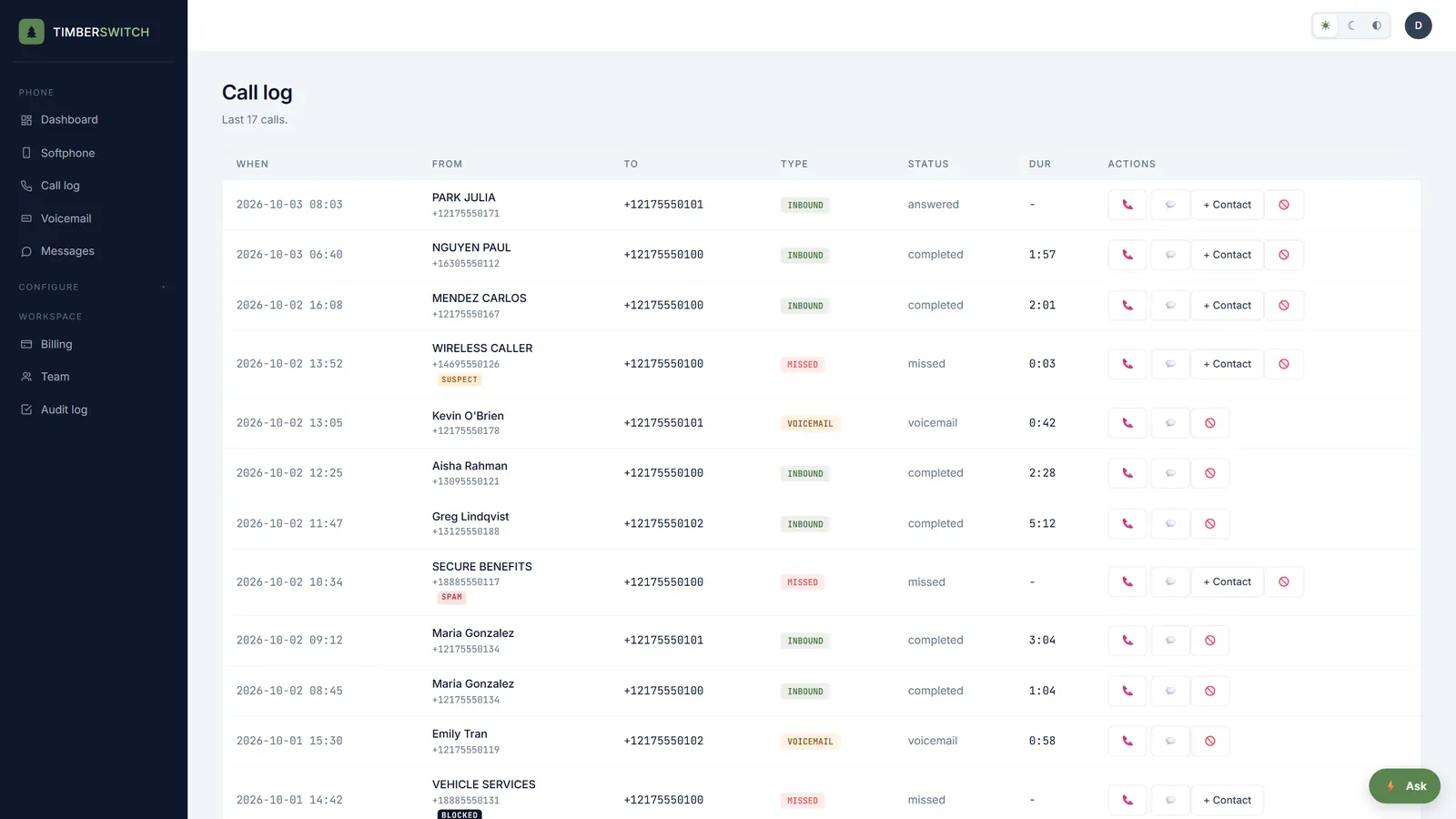
Every inbound call is checked against the carrier's caller ID signal (STIR/SHAKEN) before it rings. Unwanted calls are tagged in the call log so your team can see at a glance what is worth picking up, and one click stops a repeat caller for good.
- Calls tagged suspect, spam or blocked from the carrier's attestation
- A block button on every inbound call in the call log
- Your own block list for each business, with an optional reason, and unblock any time
- Included on every package at no extra cost
A phone menu you can change in a minute, not a support ticket.
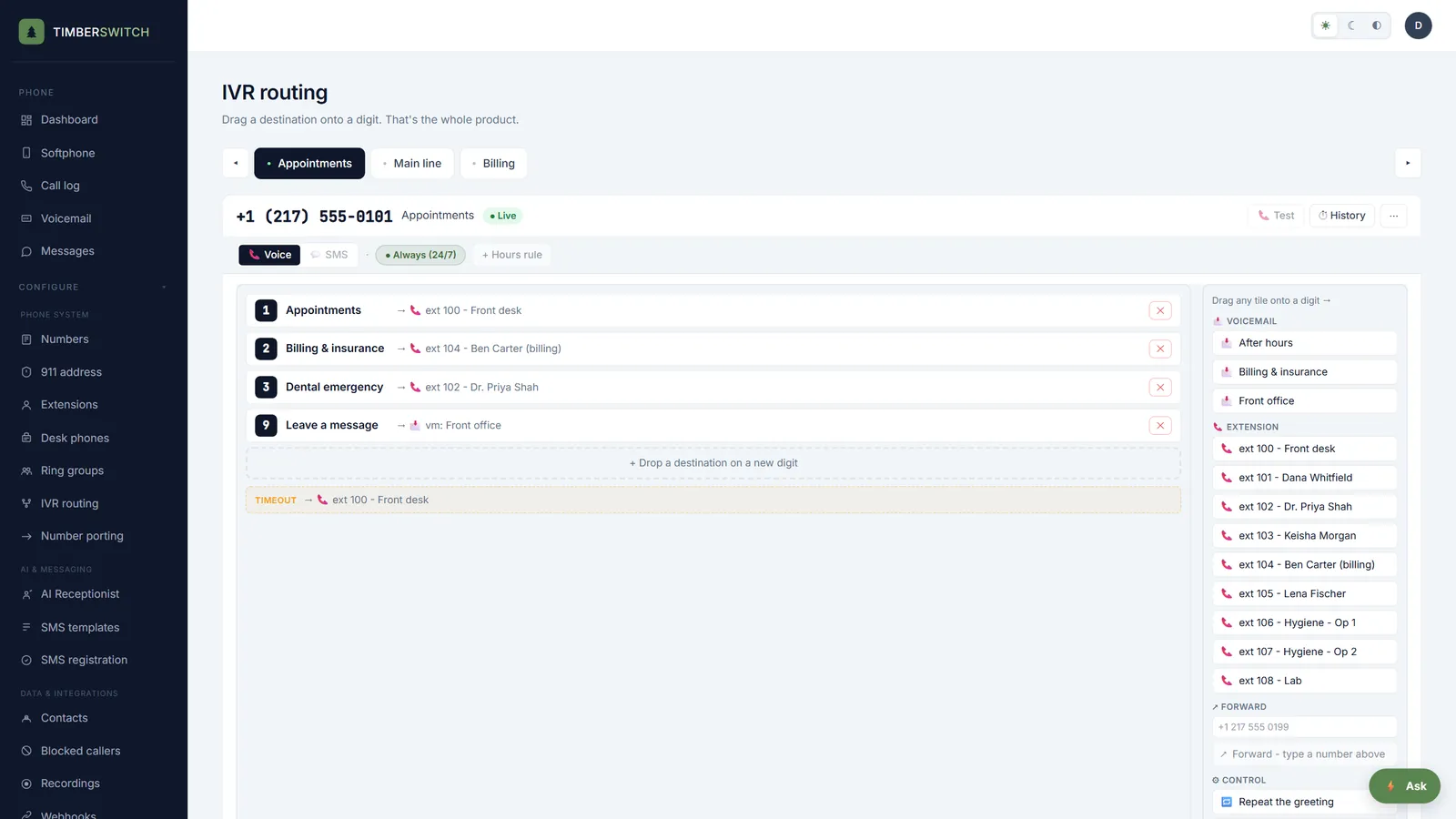
Drag a destination onto a digit and the menu is live. When your hours or your staff change, you change the menu yourself the same day, and callers still land in the right place.
- Send each digit to an extension, a voicemail box or an outside number
- Type the greeting and callers hear it read aloud
- Choose what happens on a timeout or a wrong digit: replay, go to a fallback, or hang up
- Business hours for each number, with an after-hours greeting and voicemail box
Calls find the right person, even when they are out of the office.
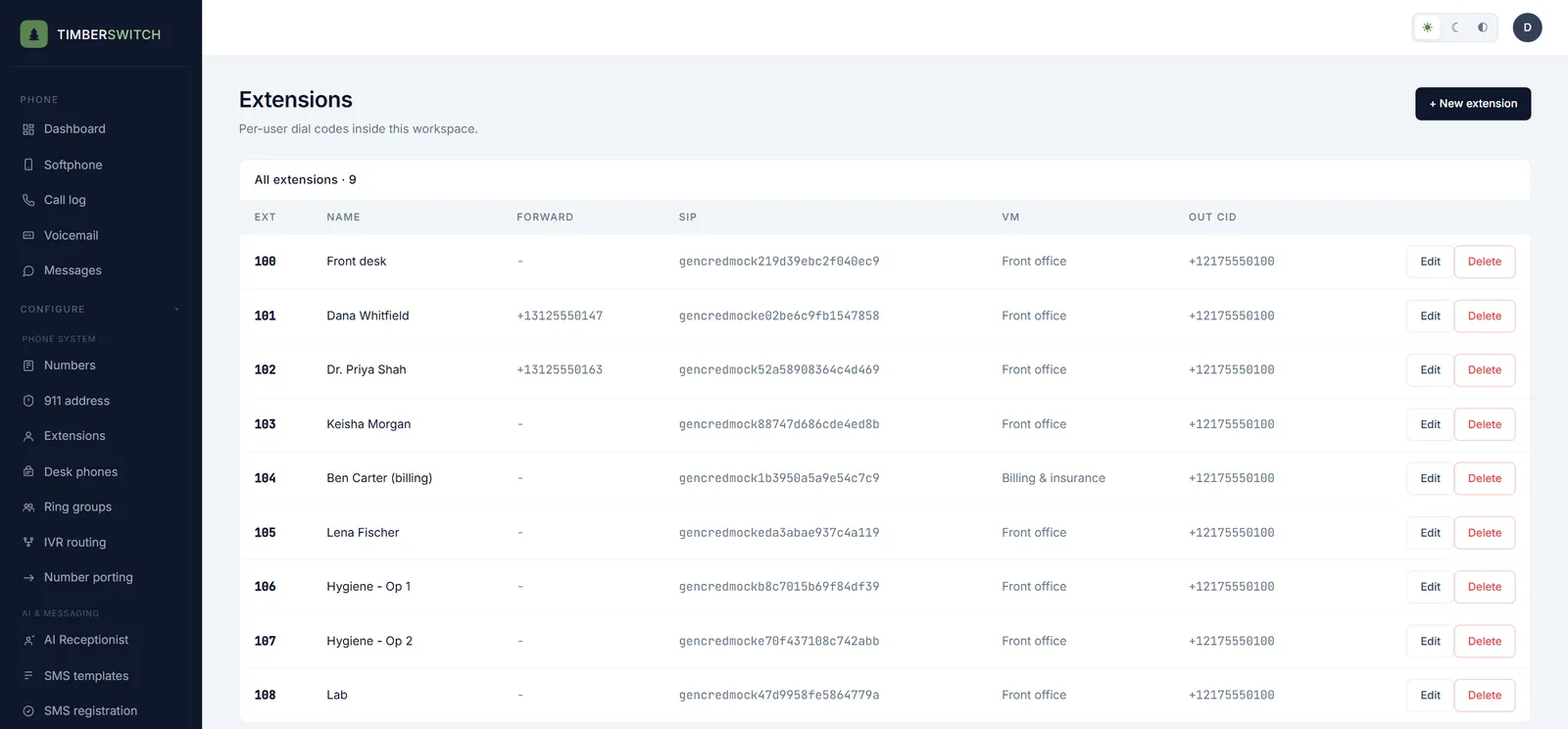
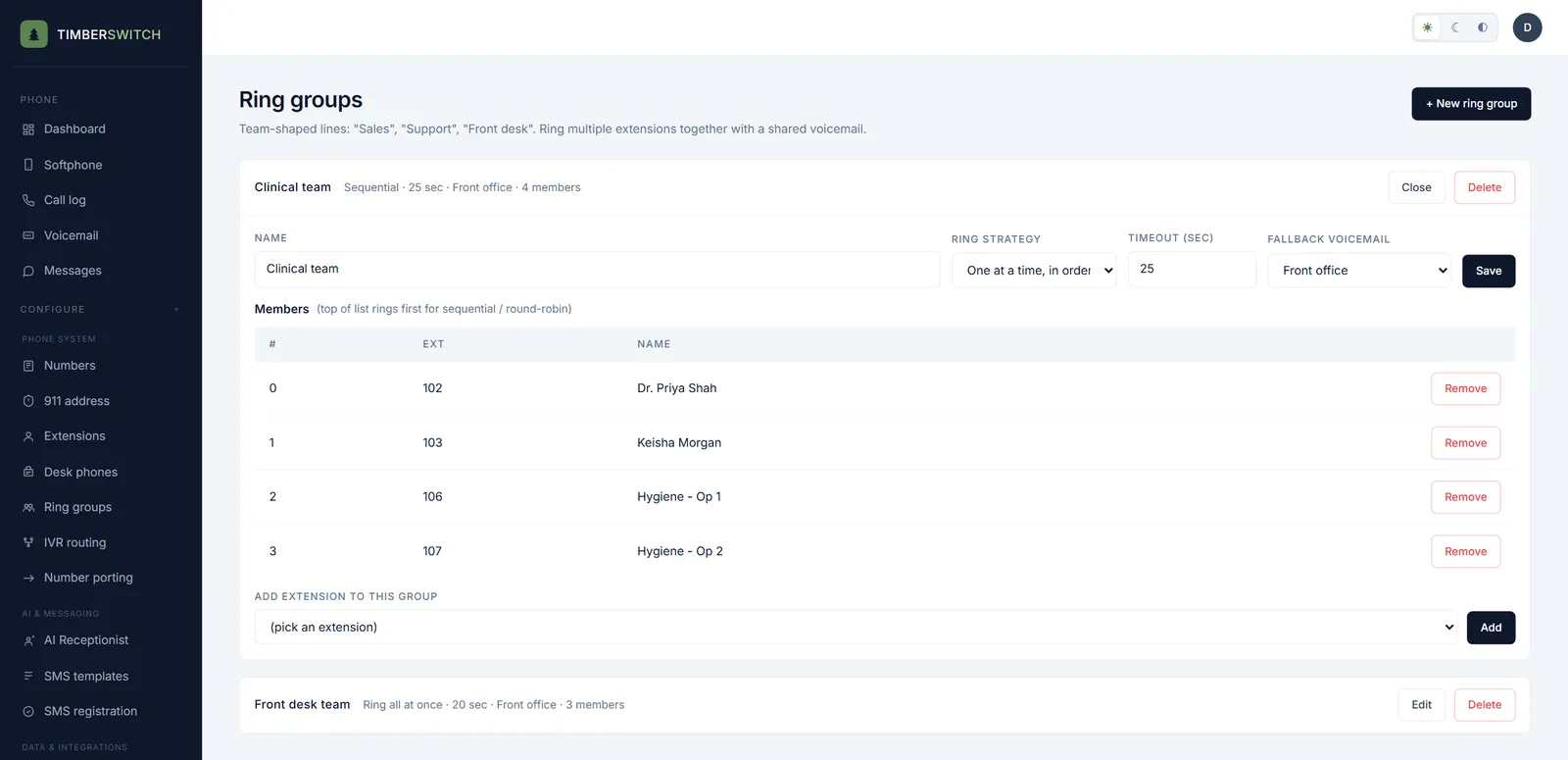
Everyone on the team, and every desk, gets an extension. Calls can ring the browser, a desk phone and a cell phone, and a ring group calls a whole team, so answering the phone never depends on one person being at one desk.
- Forward an extension to a cell phone: after the other devices, only when offline, or at the same time
- Each extension has its own voicemail box and the caller ID it shows on outgoing calls
- Ring groups ring everyone at once, one at a time in order, or rotate who goes first
- A ring timeout, then a shared voicemail box for the group
Make and take business calls from any laptop.
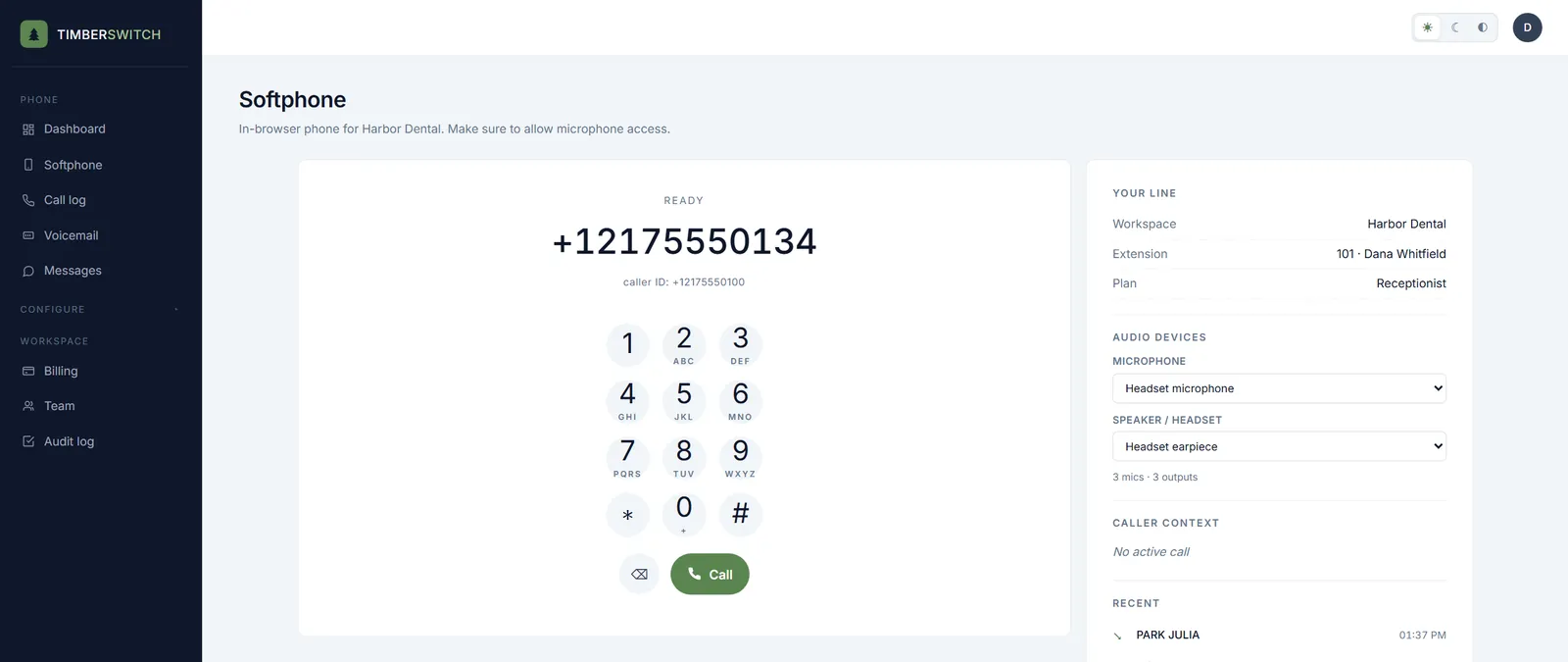
There is no hardware to buy for anyone on the team. Sign in, pick your headset, and your business line rings in the browser. Outgoing calls show your business number, not your personal cell.
- Dial pad, your line and extension, and recent calls on one screen
- Choose your microphone and speaker
- Calls go out with the business caller ID set for your extension
- Desktop and mobile apps are on the way. The browser softphone works today.
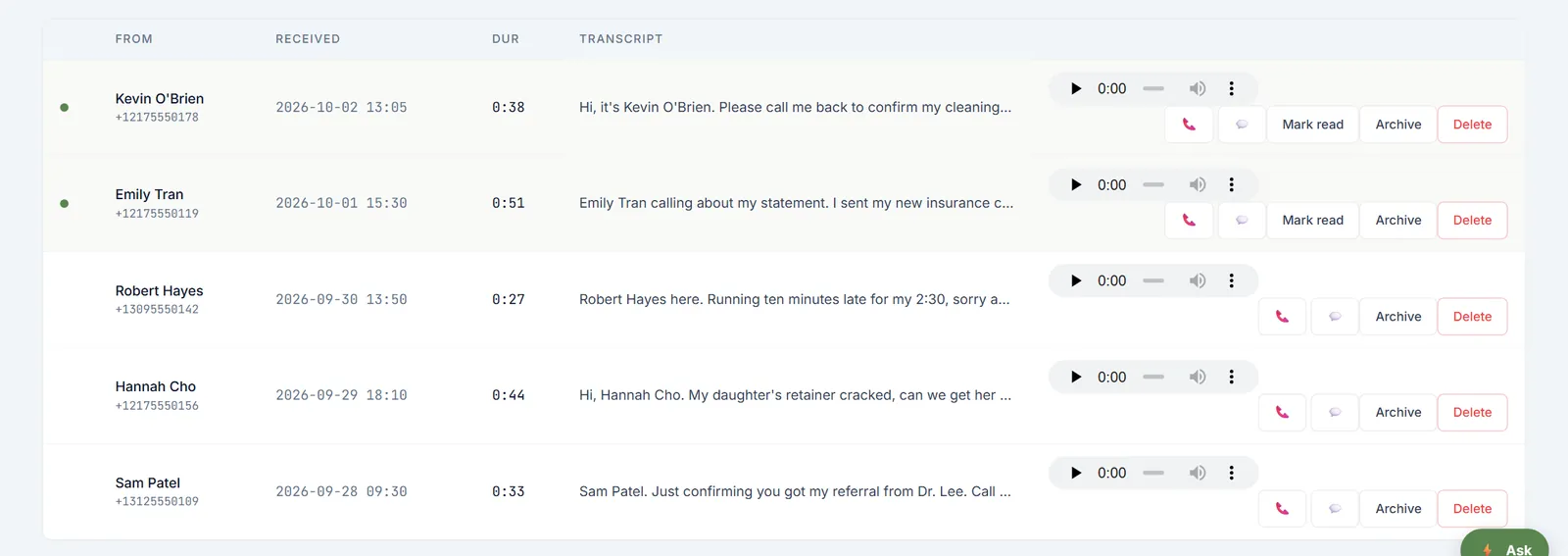
Read a voicemail in seconds instead of listening to all of it.
Every voicemail is transcribed and emailed to the people who look after that box, so the right person sees it first and calls back sooner.
- The transcript and the recording side by side in the voicemail inbox
- An email for each new message, to the people you choose for that box
- Separate boxes for people and teams, like the front office or billing
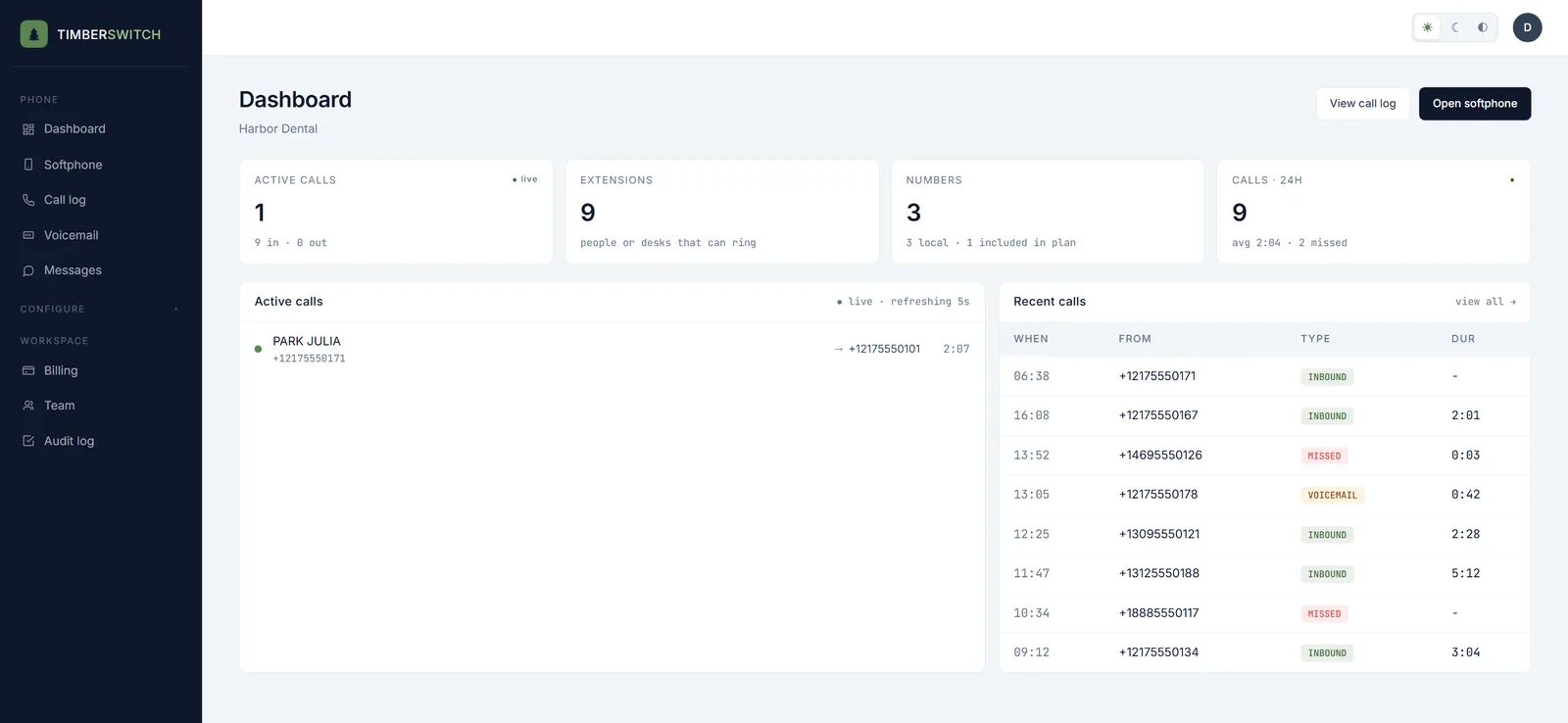
See every live call as it happens.
The dashboard shows who is on the phone right now and how the day's calls went, so an owner can check on the front desk from anywhere without asking.
- Active calls, refreshed every five seconds
- Calls in the last 24 hours, with the average length and how many were missed
- Recent calls marked inbound, missed or voicemail
- Your extension and number counts at a glance
Put your phones on a TV the whole team can see.
Open a web address on the TV, type the code it shows into the app, and it becomes a live wallboard: who is on the phone, who is still ringing, and which missed callers nobody has called back yet. Nobody signs in on the TV.
- Works in a smart TV browser, on a Fire TV Stick, a Chromecast with Google TV or a Raspberry Pi
- Calls in progress, callers ringing, missed today, voicemails waiting, and today against yesterday
- Or the latest texts in and whether someone has replied, or today's reminders and who hasn't answered
- Numbers show only their last 4 digits, and message text stays hidden unless you turn it on
- Each screen shows one view of one workspace, and you can remove it from the app at any time
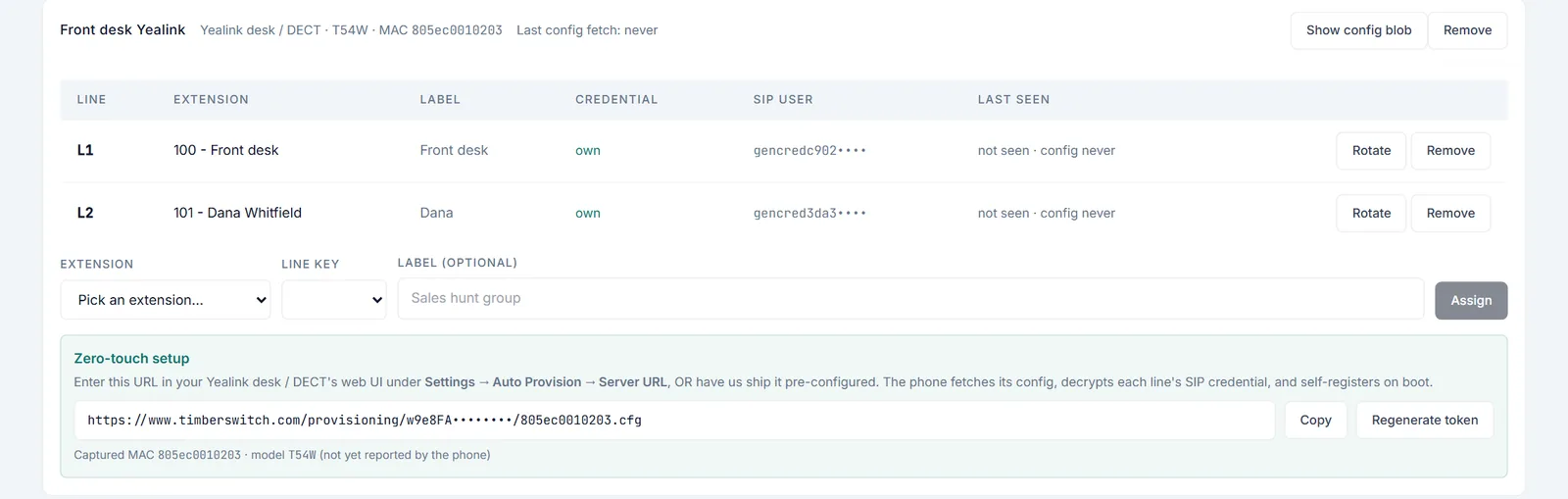
A desk phone that signs itself in.
Add the phone, assign its line keys, and during a short setup window enter the provisioning address plus a username and password. The phone downloads its settings and signs in, so nobody types a SIP password into a tiny screen.
- Yealink desk and DECT phones (beta): a per-phone provisioning login, then the phone keeps its settings
- Several line keys on one phone, each assigned to an extension
- Each line key gets its own credential, so the desk phone and the softphone never knock each other offline
- Other standard SIP phones can sign in to an extension with its SIP credential
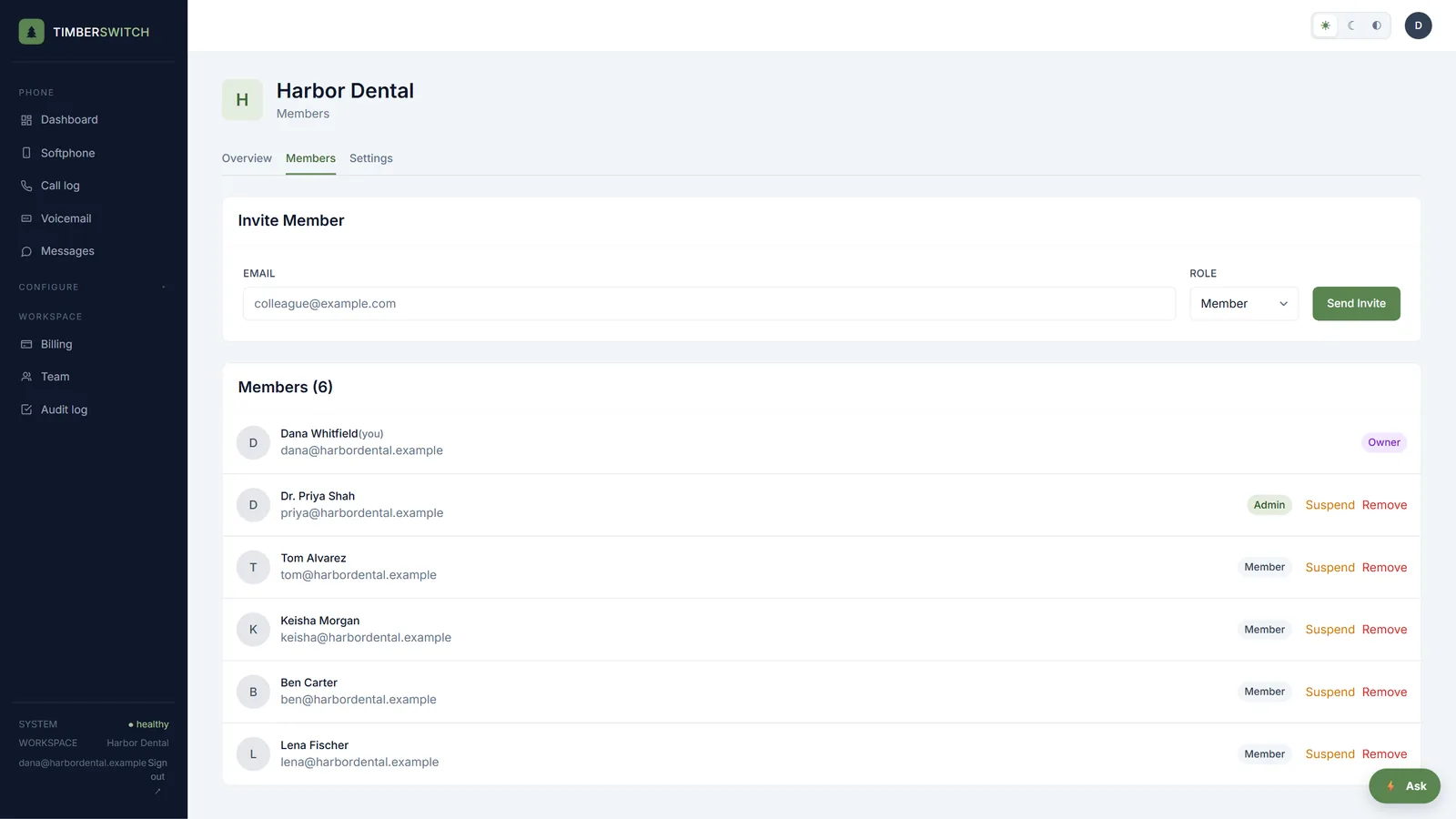
Add your team in minutes.
Logins are free: invite people by email, give each one the right role, and take access away the day someone leaves. Each person who takes calls gets an extension, $4 a month, that rings the app, a desk phone and a cell.
- Owner, admin and member roles
- Invite by email; they join your workspace with one link
- Suspend or remove someone in one click
- An audit log of who changed what
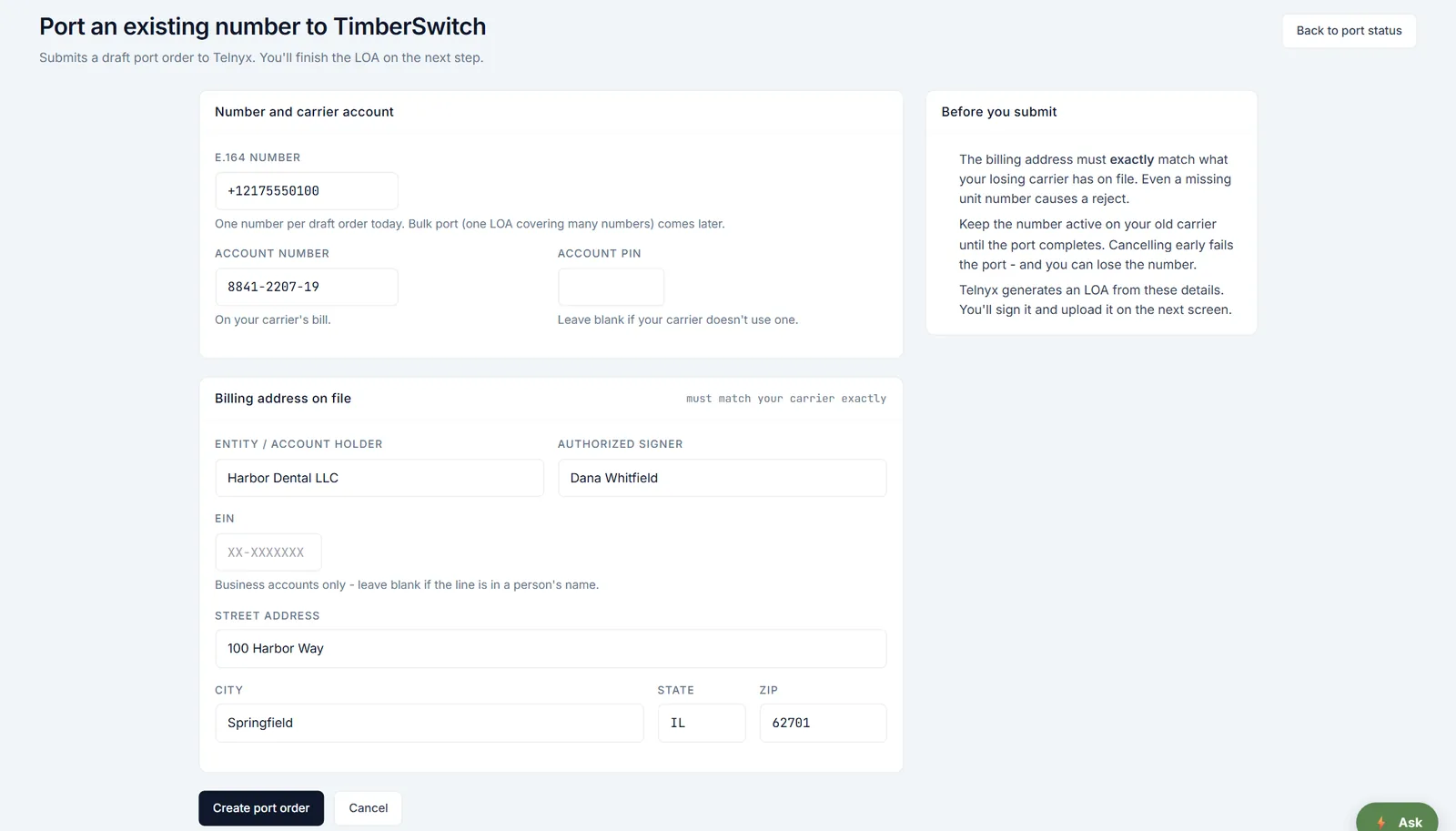
Keep the number your customers already know.
Bringing your number over is free. Your old service keeps working until the port completes, so you don't miss calls during the switch, and you can build your menus and extensions while you wait.
- No port-in fee
- One form with your number, carrier account and billing address
- You sign the letter of authorization and upload it, and we file the port
- A status page with the date your number moves over
A new local number in minutes.
Need a second line for a new location or a marketing campaign? Search for one, buy it in the app, and point it at a menu, a person or a team right away.
- Search by area code, ZIP code, or digits you want in the number
- 1 local number included, extra local numbers $5 a month
- Toll-free numbers $5 a month with 100 minutes, after your first 30 days
Free setup help, so you don't have to learn a phone system.
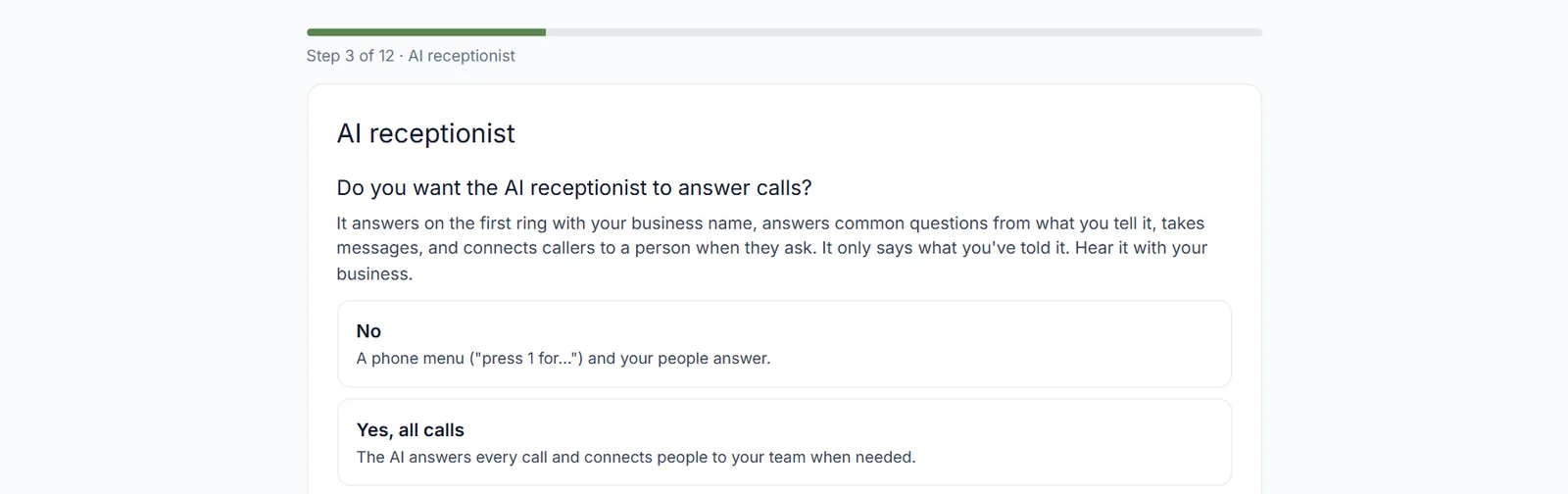
Answer a short questionnaire about how your business should answer the phone, one question at a time, and our team sets up your numbers, menus, hours and phones with you. It is free on every package.
- About ten minutes, one topic per step
- Covers your numbers, what callers hear, hours, who answers, phones and your 911 address
- Track the setup on its own status page
Send your calls into the systems you already use.
Webhooks post call and voicemail events to any address you choose, signed so your system can trust them, and a REST API with scoped keys covers the rest. Calendar, point of sale, practice software and CRM connections are Self-serve where you connect them in the app, and Guided setup where our team connects them with you.
- Webhooks signed with HMAC-SHA256
- A REST API for numbers, calls, voicemails and contacts, with scoped API keys
- Each connector is Self-serve or Guided setup. The integrations page shows which.
911 calls send your address and tell your team.
Register a dispatchable address for your location and the carrier confirms it before 911 goes live. Every 911 call, and every 933 test call, emails your owners and admins right away, as Kari's Law requires.
- Address checked with the carrier, with a clear status until it is live
- Email alerts to owners, admins and any extra contacts you add
- Test with 933 from a desk phone
- The browser softphone does not place 911 calls, so keep a backup phone
Security we can explain in plain words.
The app and browser calls are encrypted on the way to our carrier, stored data is encrypted with AES-256, and sign-ins and changes are recorded in an audit log. Our security page lists what we do and, just as plainly, what we don't have yet.
- Two-factor sign-in with an authenticator app and backup codes, and owners can require it
- An audit log of sign-ins, member changes and other security events
- No selling your data, no ads, no third-party trackers
Straight answers.
Do I pay for each person on the team?
TimberSwitch is priced per extension, not per device. Starter is $9 a month for a number and one extension, and each extra extension is $4. One extension rings the app, a desk phone and a cell. Prices are before tax.
Does every plan include the whole phone system?
Yes. Phone menus, extensions, ring groups, voicemail to text, the browser softphone, desk phone support and spam tagging come with every plan. You add extensions and numbers, never features.
Is the AI receptionist available now?
Not yet. It is built and coming soon as an add-on to any plan. Until then your calls use the phone menu, extensions and ring groups, which every plan includes.
Can I keep my current number?
Yes. Porting your number in is free, and your old service keeps working until the port completes, so you don't miss calls.
Do I need to buy desk phones?
No. Everyone can make and take calls in the browser softphone. If you want desk phones, Yealink phones (beta) sign in from a provisioning address and a per-phone login during a short setup window, and other SIP phones can sign in with an extension's credential.
Can you set it up for us?
Yes. Free assisted setup is included on every package: answer a short questionnaire and our team sets up your numbers, menus, hours and phones with you.
One plan. Add only what you need. Keep your number.
One plan from $9 a month, $4 per extra extension, free assisted setup, and a 30-day money-back guarantee.
See pricing →