An AI receptionist that answers
your top ten questions.
Most calls to a small business are the same ten questions: hours, prices, location, booking. Write the answers down once, and the receptionist answers them from your facts, takes a proper message for everything else, and rings your team when a caller wants a person.
- ✓ Free setup: we set it up for you
- ✓ Free number porting help
- ✓ Support from real people, included
- ✓ No setup fees
Every caller gets a friendly answer on the first ring, even when the whole team is busy.
Coming soon as an add-on to any plan. It greets callers as your business, answers common questions from the facts you give it, and asks before it rings a person. If nobody is free, it takes a proper message, so you call back the right people first instead of playing voicemail tag.
- Your greeting, your choice of voice and your house rules
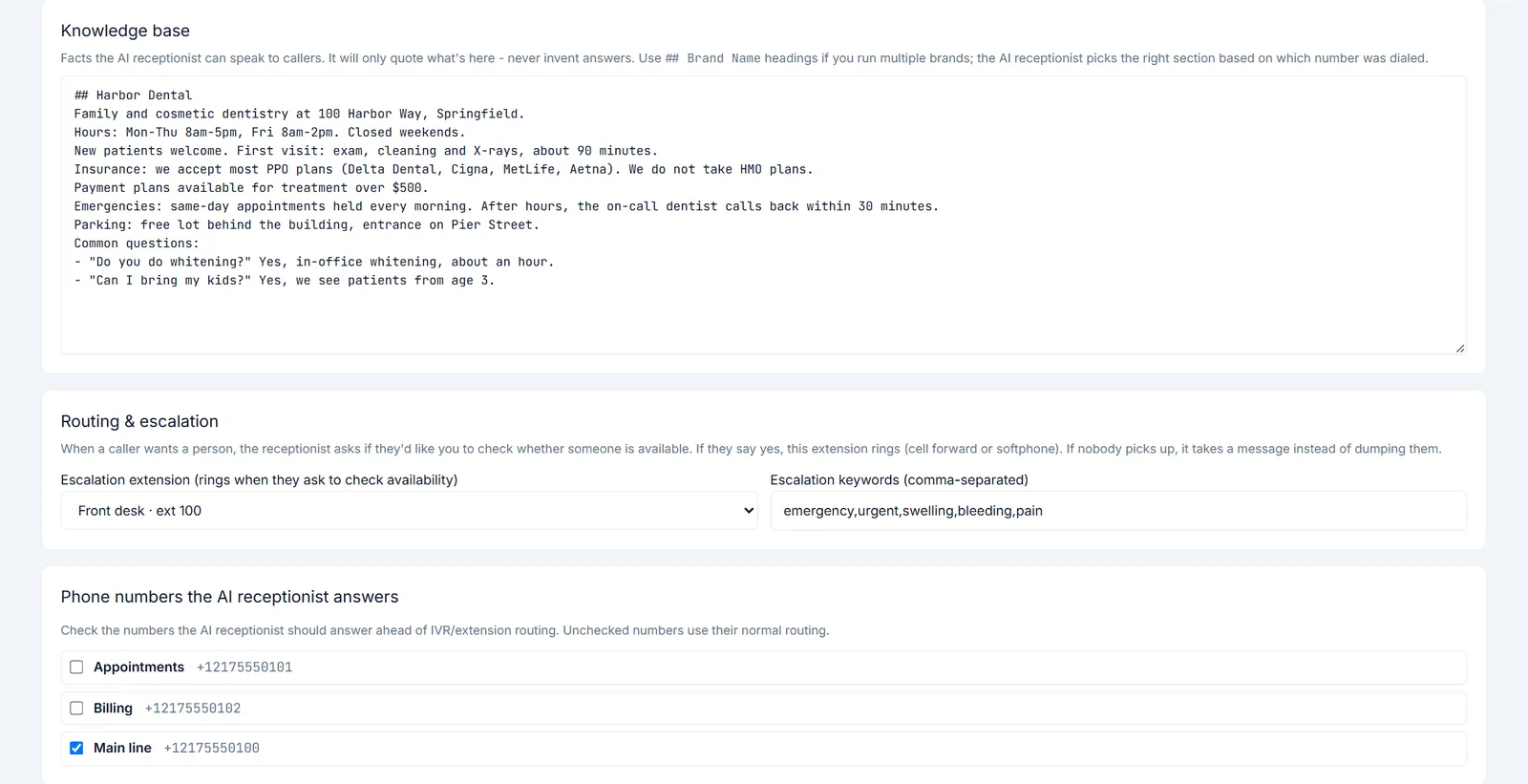
- Answers only from the facts you give it, like hours, insurance or parking, and never makes up an answer
- When a caller wants a person, it asks first, then rings the extension you choose
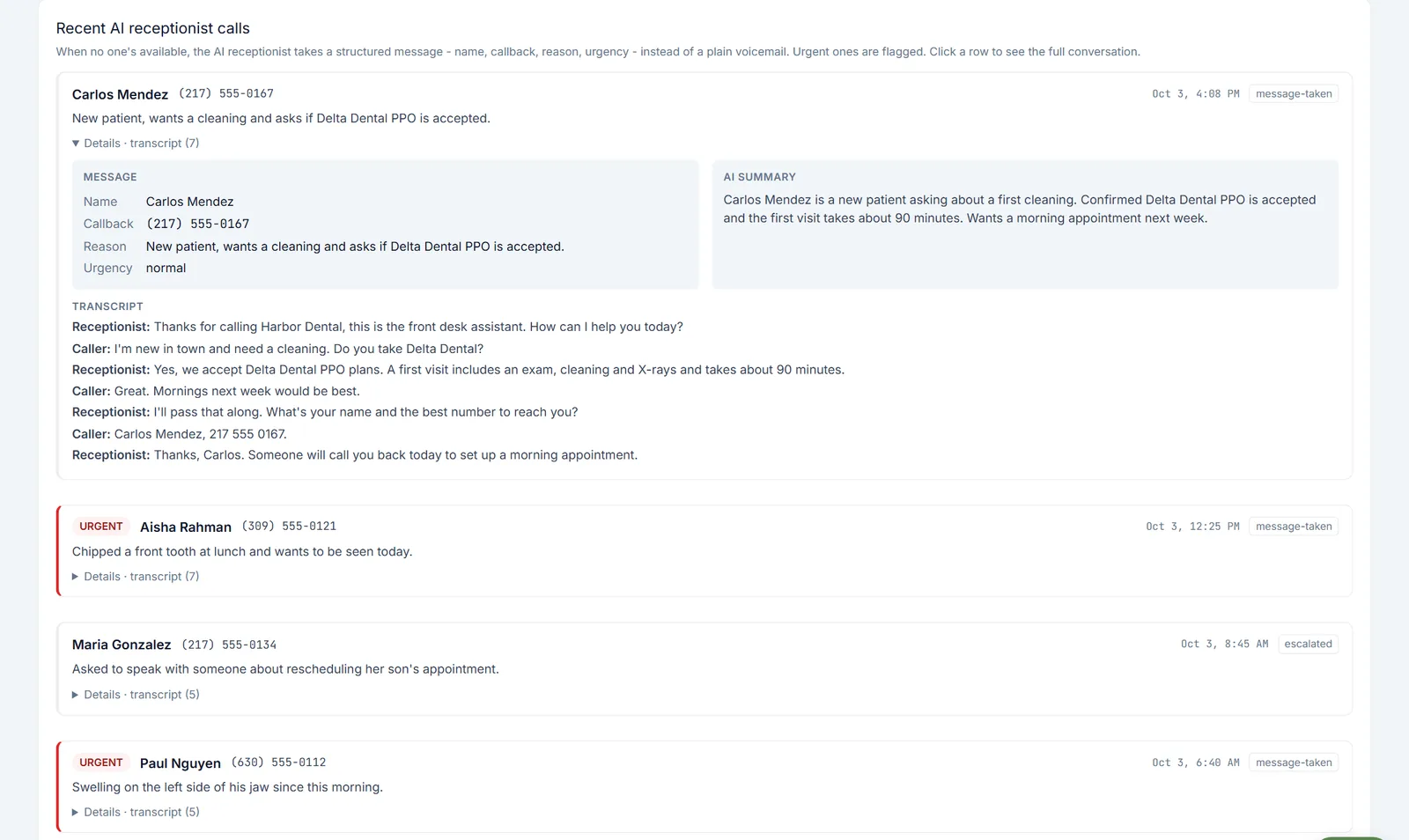
- Takes a message with name, callback number, reason and urgency, plus an AI summary and the full transcript
- Flags urgent calls, using keywords you set
The AI receptionist is built and being readied for launch. Until it is switched on, calls ring your phone menu, extensions and ring groups as usual, and every package already includes those.
See pricing →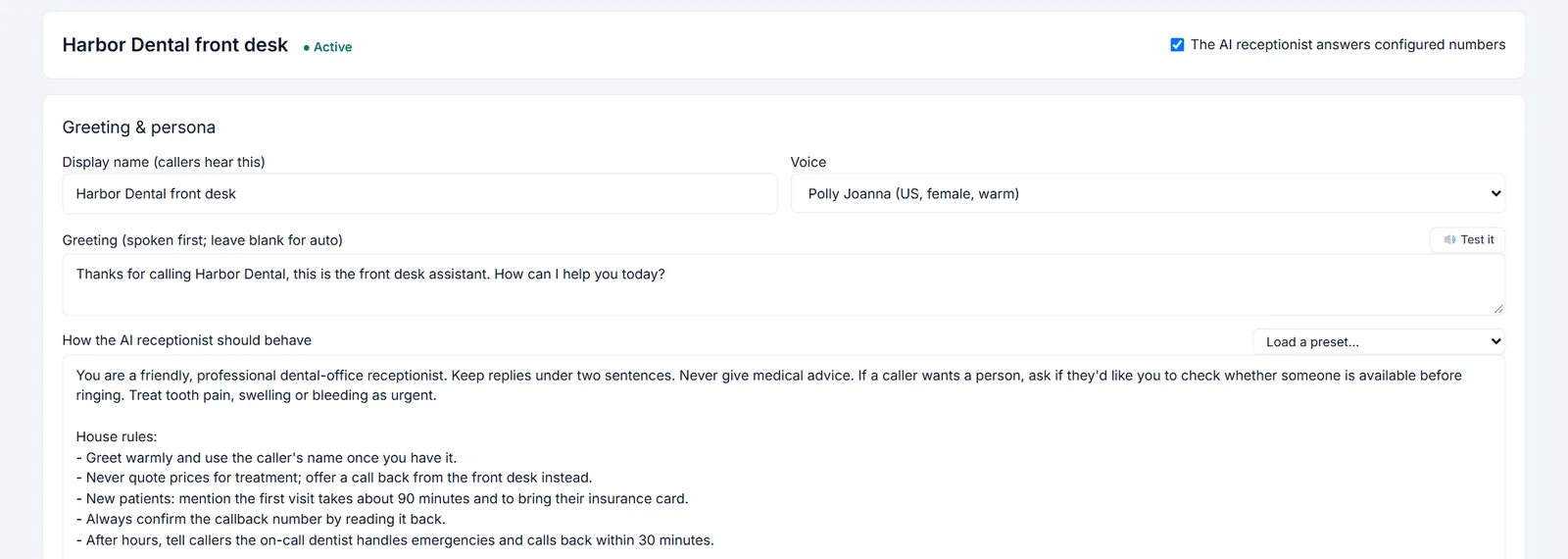
The questions your callers ask most.
Each page lists the ten questions a business like yours hears all day, and what the receptionist does with each one. Use it as a checklist for the facts you write into the receptionist. It only quotes what you write, so a blank never becomes a made-up answer.
Dental offices
Ring groups for the front desk, after-hours greetings, voicemail to text and the receptionist.
Veterinary clinics
Can I book or move an appointment? Is this an emergency? And eight more.
Restaurants
What are your hours? Can I make a reservation? And eight more.
HVAC and home services
My system is down. Can you come today? Can I book an estimate? And eight more.
Salons and spas
Can I book, move or cancel? Who has openings today? And eight more.
Animal shelters and rescues
Is this dog still available? How does adoption work? And eight more.
Law offices
Do you handle my kind of case? Do you offer a free consultation? And eight more.
Works with the software you already run.
53 connectors for calendars, point of sale, practice software, field service and CRMs. Connect the self-serve ones yourself. For the rest, guided setup is included. Our team connects it with you, usually within 1-2 business days. Booking and lookups turn on with the AI receptionist; until then it takes a message instead.
Webhooks
Self-serveSigned call, voicemail and text events posted to any URL you choose.
Anyone with another systemGoogle Calendar
Guided setupFind an open time and book it into your Google calendar while the caller is on the line.
Most small officesMicrosoft 365 / Outlook calendar
Guided setupFind an open time and book it into your Outlook calendar while the caller is on the line.
Offices on MicrosoftZapier app
Guided setupCall, voicemail, text and AI message triggers, plus text, block and contact actions, for thousands of apps.
Anyone with another systemCalendly
Guided setupOffer callers real open times from your Calendly event types and book the one they pick, with your usual Calendly confirmations.
Consultants, advisors, coaches and professional officesHubSpot
Guided setupLog every call on the right HubSpot contact, create contacts for new callers, and greet known callers by name.
Small businesses, agencies and nonprofits on HubSpot, including the free CRMZoho CRM
Guided setupLog calls in Zoho CRM on the right contact or lead, and add new callers as leads with the details read back.
Cost-conscious small businesses and service firms on Zoho CRMMake
Guided setupSend calls, voicemails and messages into Make scenarios, then on to the thousands of apps Make connects.
Anyone who automates with Maken8n
Guided setupSend calls, voicemails and messages into n8n workflows, on n8n Cloud or your own server.
Teams that automate with n8n, including self-hostedSlack
Guided setupPost missed calls, voicemail transcripts and messages the AI receptionist takes to the Slack channel your team already watches.
Small teams that run their day in SlackMicrosoft Teams
Guided setupPost missed calls, voicemail transcripts and messages to a Teams channel through a Teams workflow.
Offices that run on Microsoft 365Zendesk
Guided setupTurn voicemails and missed calls into Zendesk tickets with the transcript and the caller's number attached.
Support teams on ZendeskFreshdesk
Guided setupTurn voicemails and missed calls into Freshdesk tickets with the transcript and the caller's number.
Support teams on FreshdeskJira Service Management
Guided setupTurn voicemails into Jira Service Management requests, with the transcript and the caller's number.
IT providers, managed service providers and software support teamsStripe payment links
Guided setupText callers a secure Stripe payment link for a deposit, an order or a balance, so nobody reads a card number out on the phone.
Businesses that already take card payments with StripeSquare payment links
Guided setupText callers a secure Square payment link for a deposit, a balance or an order, paid on Square's own page.
Restaurants, salons and service businesses that take payments with SquareGoogle Sheets
Guided setupLet callers check an order, job or account status from a Google Sheet you already keep, with a texted code before anything personal is read out.
Small businesses that track customers or jobs in a spreadsheetAirtable
Guided setupLet callers check an order, job or account status from an Airtable base, with a texted code before anything personal is read out.
Small teams and nonprofits that run their records in AirtableStraight answers.
Is the AI receptionist available now?
Not yet. It is built and coming soon as an add-on to any plan. Until then your calls use the phone menu, extensions and ring groups, which every plan includes.
Does the AI receptionist make things up?
No. It answers only from the business facts you give it. If the answer isn't there, it says it isn't sure and offers to take a message so someone on your team can follow up.
What happens when it can't answer a question?
It takes a message: the caller's name, the reason for the call and the best callback number, which it reads back digit by digit to confirm. You get the message with an AI summary and the full transcript.
Can callers still reach a real person?
Yes. When a caller asks for someone, it asks first, then rings the extension you choose. If nobody picks up, it takes a message, so a caller is never stuck.
Can it book appointments?
It takes the booking request, with the caller's name, callback number and preferred times, and passes it to your team. Booking straight into your calendar or practice software turns on later, through a connector.
Will callers know they are talking to an AI?
If a caller asks, it says honestly that it is an AI assistant for your business, then offers to help or take a message.
How much does it cost?
The AI receptionist is coming soon as an add-on to any plan. Today TimberSwitch starts at $9 a month for your business: a number, an extension and 300 minutes each way, plus $4 a month for each extra extension, before tax. There is a 30-day money-back guarantee.
Business phones from $9 a month.
The AI receptionist is coming soon as an add-on to any plan. Today TimberSwitch starts at $9 a month for your business: a number, an extension and 300 minutes each way, plus $4 a month for each extra extension, before tax.
See pricing →